
Risk Register Software
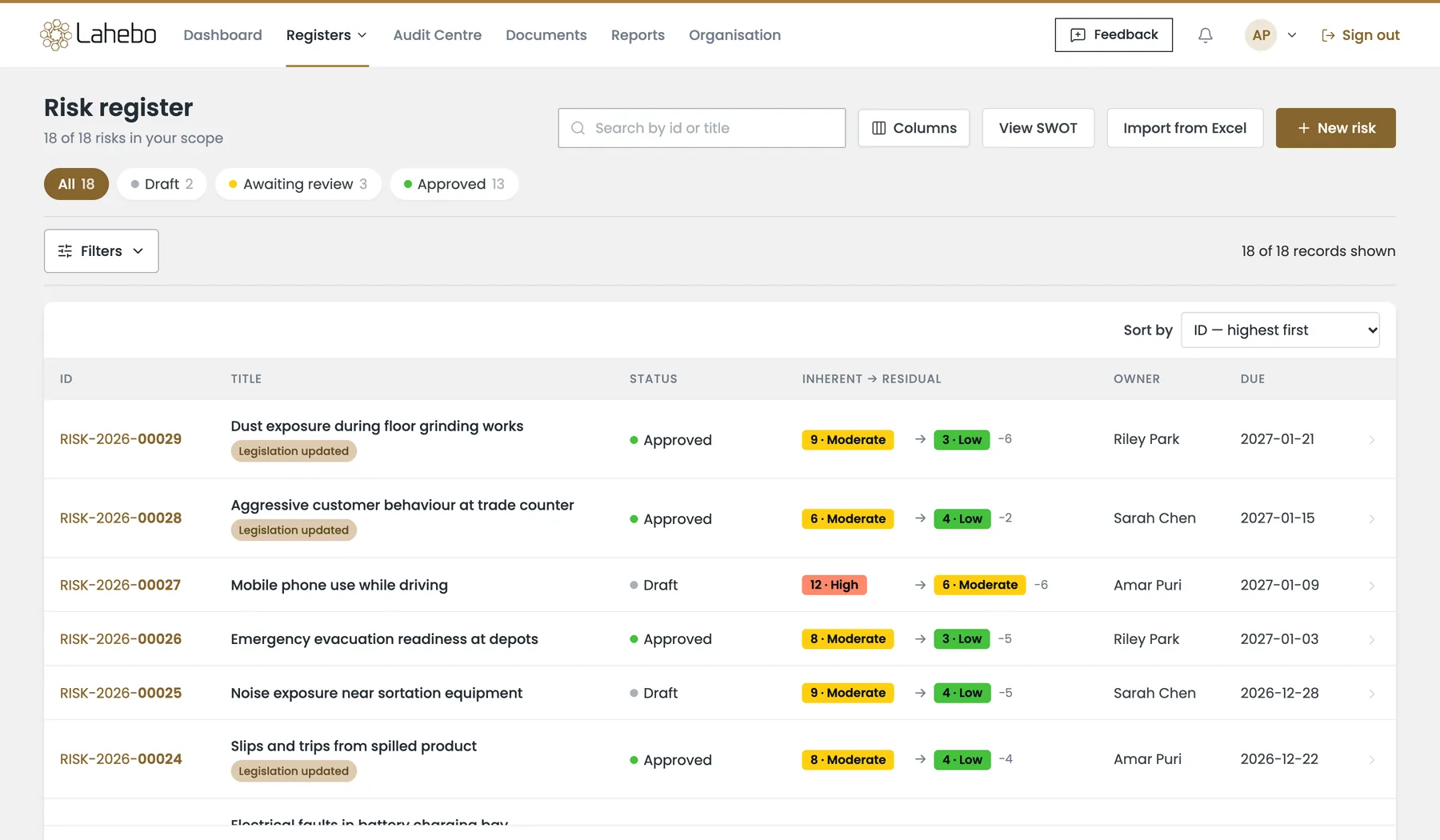
Identify, Assess, Monitor and Track your Organisation Risks All in one place.
Legal Compliance Risk Register software is the single destination for managing your Organisation’s Risks that could potentially impact your organisation or project. There are several features in Risk Register, that will cater all your organisation’s compliance needs. New to this? Read our complete guide to what a risk register is and how to build one.
Manage Risks your way
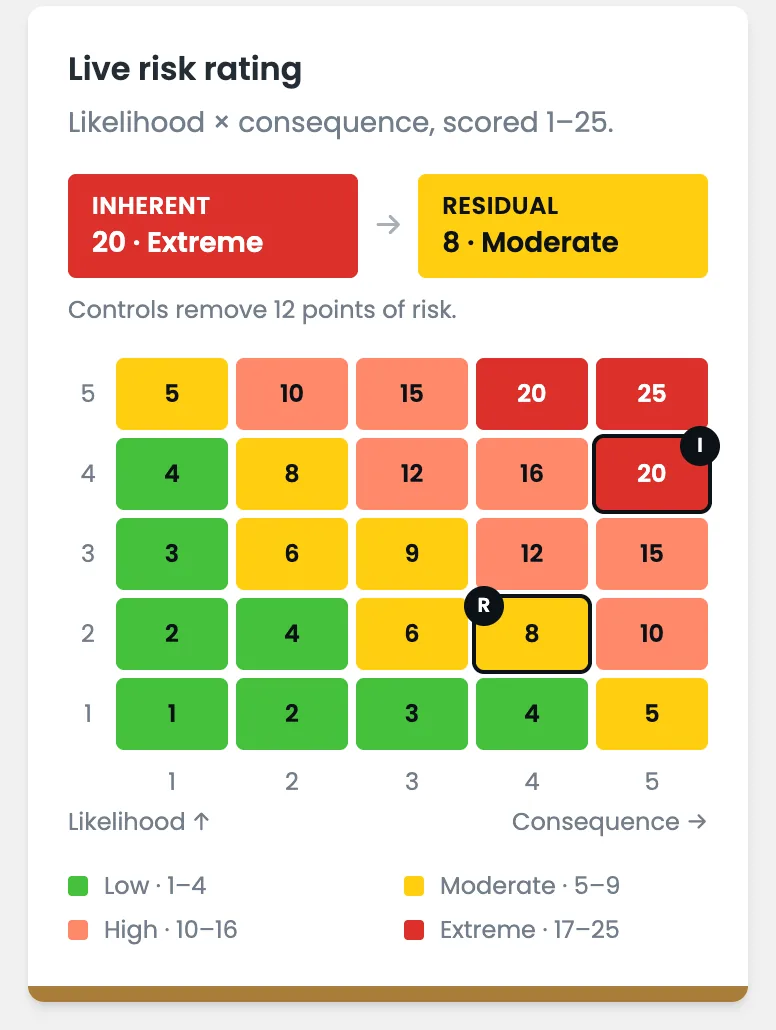
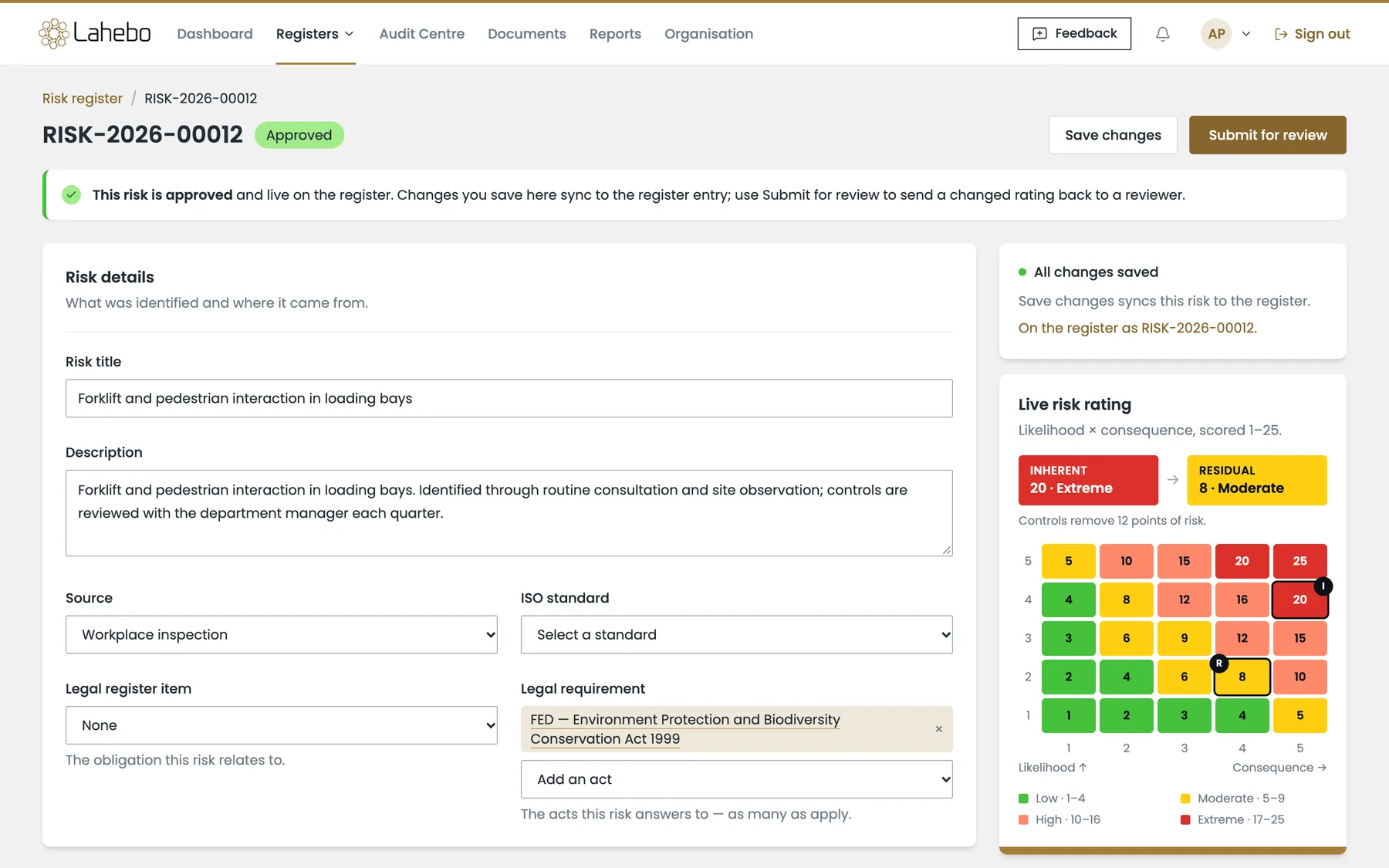
You can either raise or create a potential risk and send it to get approved. Once approved, you can capture the likelihood and consequences of the risk and enter Inherent Risk score (before Mitigation) and Residual Risk Score (after Mitigation). You can also connect your legal business Register which is compliant to this Risk.
Strategise Risk Mitigation
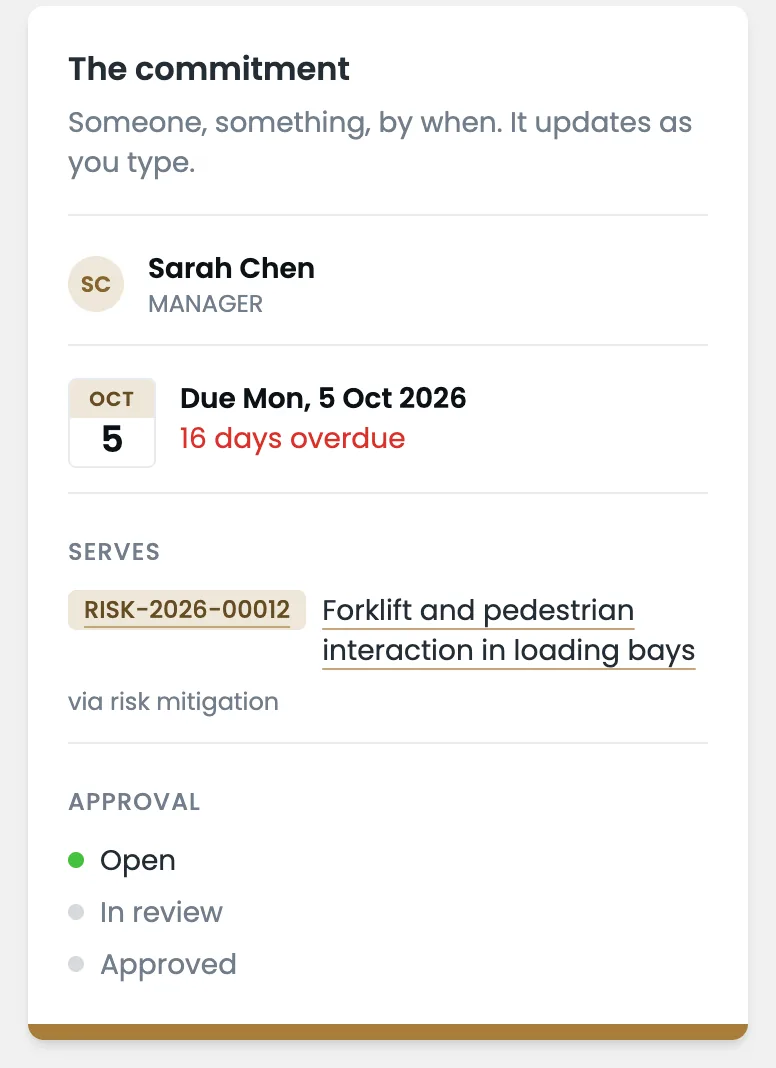
You can mitigate or minimise your risks by creating actions or controls from your potential risks. Assign to the person who is responsible to complete that action. Action assigned through a risk will be created Automatically in the Action Management Module.
Monitor and Track Risks Efficiently
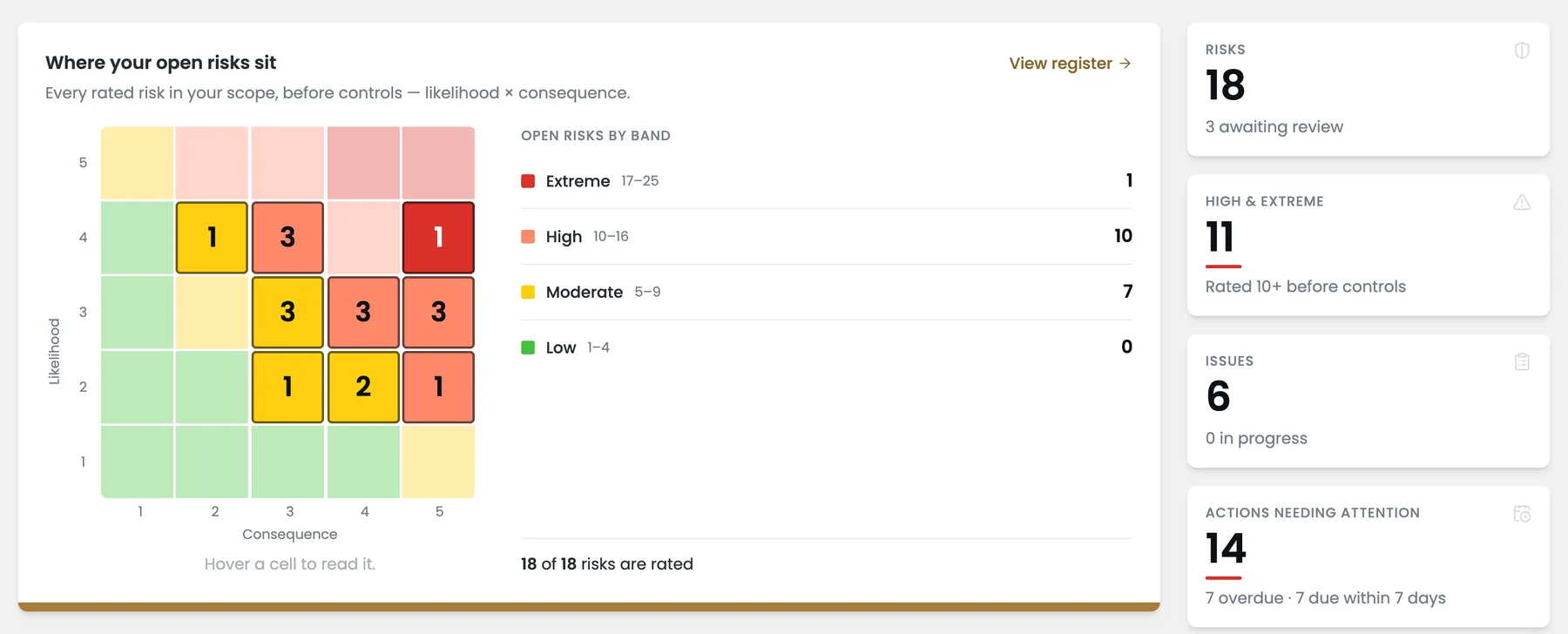
Risk Management is an on-going process, and you can monitor and assess your risks efficiently through the Dashboard. The Risk heat map in dashboard will display the configured Risk Matrix with the count of inherent risk available in the Risk Register and one can review the risks based on Risk severity (Low, Medium, Moderate and Extreme).
Features
A central GRC platform to create, edit and monitor Risks and Actions
Legislation Library
Option to build legal register from our list of libraries and get AI powered notification when there are new updates to the legislations.
Risk Management
Risk Identification and assessment with connecting mitigation to be tracked to completion and assess risk statuses.
Incident Management
Efficiently raise, investigate, manage issues/incidents, and mitigation actions through the issue module and enhance compliance.
Action Center
Multiple features for precise action management with workflow approval process and timely notifications.
Reporting
Dynamic reports with fixed and custom filters with various other loaded features.
Frequently Asked Questions
What is a Risk Register? Complete Definition and Guide
Risk Register helps you create an unlimited number of risks, all organised in one section for a better overview. From a centralised location, detailed updates can be made, mitigation controls can be integrated, and all related actions can be monitored easily while enabling effortless creation and management of risks.
Risk Register Templates and Examples
A Risk Register Template helps to identify risks and evaluate them within the organization. You can Bulk upload Risks using the default template from the platform.
Steps:
- Download the Excel file template
- Fill in the fields in the template
- Data Import and review
- Upload to Risk Management
How to Create an Effective Risk Register
To add a risk, follow these four steps. First, write a comprehensive risk description that includes its location, department, legal requirements, and details of the source. Second, include applicable ISO standards along with any hazard information. After that, add risk ratings (before and after mitigation), the mitigation steps, and designate a user. Lastly, add remarks, define a timeline, and save that risk.
Risk Register Best Practices
Define causes, effects, and risks consistently using a risk matrix along with quantifiable severity levels. Evaluate likelihood and impact, determine preventive measures, and update regularly. Dynamic tracking of status changes can be done in real-time through dashboards or other specific tools.
Risk Register Software Features
The Risk Register module consolidates all aspects of risk management by interrelating risks with mitigation measures, controls, and taking actions. It also facilitates systematic, preventive approaches by letting controls to be executed within the platform.
What is the difference between a risk register and a risk assessment?
A risk assessment is a process, the act of identifying and evaluating a specific risk. A risk register is the document that records the outputs of multiple risk assessments over time, tracked and managed on an ongoing basis.
Is a risk register a legal requirement in Australia?
The WHS Act 2011 requires organisations to manage workplace risks, but doesn’t prescribe a specific format. However, documenting your risk management activities is expected by regulators and auditors. In regulated sectors, NDIS, aged care, and APRA-regulated financial services, a formal risk register is effectively mandatory.
How often should a risk register be reviewed?
At minimum, a comprehensive annual review. Specific triggers should prompt immediate review: incidents or near-misses, new equipment or processes, legislative changes, audit findings, or significant organisational change. High-risk industries should review quarterly.
What is the difference between a risk register and a compliance register?
A risk register records potential risks, things that might go wrong. A compliance register records legal and regulatory obligations, things you must do. They are deeply interconnected: non-compliance is itself a risk.
What is the difference between inherent risk and residual risk?
Inherent risk is your exposure before any controls are applied. Residual risk is what remains after controls are in place. Both should be documented in your risk register. A risk with an inherent score of 20 (Extreme) reduced to a residual score of 4 (Low) demonstrates your controls are working, critical evidence for auditors.
Can I use Excel for my risk register?
Yes, especially as a starting point for small organisations. Excel is adequate for simple registers with few entries. For organisations managing more than 20-30 risks, operating across multiple sites, or in regulated sectors, dedicated software like Lahebo provides automated workflows, audit trails, and real-time risk monitoring that Excel cannot replicate.
In this guide
What Is a Risk Register?
A risk register, also called a risk log or risk management register, is a structured document or database that records every risk an organisation has identified, how likely it is to occur, what the consequences would be, and what controls are in place to manage it.
Think of it as your organisation's early warning system. Rather than reacting to problems after they occur, a risk register forces you to look ahead, ask "what could go wrong?", and have an answer ready before it does.
Under AS/NZS ISO 31000:2018, Australia's risk management standard, the risk register sits at the heart of any formalised risk management framework. It connects risk identification, analysis, evaluation, and treatment into one coherent, reviewable system. Unlike a one-off risk assessment, it is a living document that evolves as your business changes.
Why Australian Organisations Need a Risk Register
In Australia, the case for maintaining a formal risk register goes beyond good management practice. For most organisations it is a regulatory expectation, and in many contexts, a legal obligation.
Work Health and Safety (WHS) Act 2011
Every Person Conducting a Business or Undertaking (PCBU) has a primary duty of care to manage work-related risks so far as is reasonably practicable. The risk register is the primary documented evidence that you have fulfilled this duty. Safe Work Australia's Model Code of Practice specifically references documenting identified hazards, risk assessments, and control measures. See Lahebo's WHS Risk Management guide for more.
NDIS Quality and Safeguards Framework
Registered NDIS providers must demonstrate active risk management under the NDIS Quality and Safeguards Commission's Practice Standards. A risk register provides documented evidence during audits and registration renewals.
Aged Care Quality Standards
Under Standard 8, Organisational Governance, aged care providers must have a functioning risk management system. Following the Royal Commission into Aged Care Quality and Safety, a formal risk register is now effectively table stakes for compliance and audit readiness.
APRA-Regulated Financial Services
Under CPS 220 Risk Management, banks, insurers, and superannuation funds must identify, assess, and manage material risks with appropriate documentation. A risk register is central to demonstrating compliance during APRA reviews.
The 8 Key Components of a Risk Register
| Component | Description | Example |
|---|---|---|
| Risk ID | Unique identifier for tracking | R-2026-047 |
| Risk Description | Clear statement: cause, event & consequence | "Chemical splash during decanting, potentially causing permanent vision damage" |
| Risk Category | Classification to group similar risks | Operational / WHS / Compliance / Financial |
| Likelihood Rating | How probable is the risk occurring? | 1 (Rare) → 5 (Almost Certain) |
| Consequence Rating | How severe would the impact be? | 1 (Insignificant) → 5 (Catastrophic) |
| Risk Score | Likelihood × Consequence = priority | 12 (High) |
| Control Measures | Actions to eliminate or minimise the risk | "Bunded pallets, spill kits, mandatory PPE, quarterly training" |
| Risk Owner | Named individual accountable for the risk | Workshop Manager, Jane Smith |
How to Create a Risk Register: 7 Steps
01Define Your Scope and Objectives
Decide what the register covers, enterprise-wide, project-level, WHS-specific, or framework-aligned. Your scope determines who is involved, which categories apply, and how granular the entries need to be.
02Assemble Your Risk Identification Team
Include frontline workers, supervisors, compliance officers, and senior leadership. Use facilitated workshops, site walkthroughs, and past incident reports to surface risks comprehensively.
03Identify and Document All Risks
Write precise descriptions: not "manual handling risk" but "risk of musculoskeletal injury from lifting 25kg cement bags more than 20 times per shift." Vague entries make it impossible to design effective controls.
04Assess Likelihood and Consequence
Rate each risk on Likelihood (1-5) and Consequence (1-5). Multiply them to get the inherent risk score, your baseline exposure before any controls are applied.
05Apply the Hierarchy of Controls
- Elimination, Remove the hazard entirely (most effective)
- Substitution, Replace with something less hazardous
- Engineering controls, Physical barriers, machine guards, ventilation
- Administrative controls, Safe work procedures, training, signage
- PPE, Last line of defence only
Then recalculate the residual risk score after controls are applied to show the reduction achieved.
06Assign Risk Owners and Deadlines
Every risk needs a named individual, not "the team." That person is accountable for controls, reviews, and escalation. Set realistic deadlines and track completion.
07Establish a Review Cycle
Review immediately after any incident or near-miss; when significant changes occur; quarterly for high-risk industries; and at minimum annually for a comprehensive review.
Risk Rating Matrix: Australian Standard
The 5×5 matrix is the standard used by Australian organisations, aligned to AS/NZS ISO 31000:2018 and Safe Work Australia guidance. Multiply Likelihood × Consequence to get your risk score.
Low (1-4)
Medium (5-9)
High (10-14)
Extreme (15-25)
| Likelihood ↓ / Consequence → | 1 Insignificant | 2 Minor | 3 Moderate | 4 Major | 5 Catastrophic |
|---|---|---|---|---|---|
| 5, Almost Certain | 5 | 10 | 15 | 20 | 25 |
| 4, Likely | 4 | 8 | 12 | 16 | 20 |
| 3, Possible | 3 | 6 | 9 | 12 | 15 |
| 2, Unlikely | 2 | 4 | 6 | 8 | 10 |
| 1, Rare | 1 | 2 | 3 | 4 | 5 |
Inherent vs. residual risk: Document both the score before controls (inherent) and after controls (residual). This demonstrates the effectiveness of your mitigation to auditors and leadership.
Risk Register by Industry: Australian Examples
Construction and Infrastructure
Australia's highest-risk industry for workplace fatalities. WHS risk registers must cover falls from height, struck-by incidents, excavation collapse, mobile plant, silica dust, and asbestos. Principal contractors on projects over $250,000 must include a risk register in their written WHS management plan under the Work Health and Safety Regulations 2017.
Healthcare, NDIS, and Disability Services
Registers must cover participant safety (medication errors, falls, infection control, abuse and neglect) and workforce safety (manual handling, burnout, aggressive behaviours). The NDIS Quality and Safeguards Commission expects your risk register as one of the first documents during certification audits.
Aged Care
Following the Royal Commission, risk management standards have risen significantly. Key categories: resident safety (falls, pressure injuries, elopement), workforce risks, and Aged Care Quality Standards compliance (Standard 8).
Financial Services and Corporate
For APRA-regulated entities and ASX-listed companies, risk registers operate enterprise-wide, aligned to APRA CPS 220, ISO 31000, and ASX Corporate Governance Principles. See Lahebo's GRC Software guide for enterprise-scale risk management.
Spreadsheet vs. Software: When to Upgrade
| Capability | Spreadsheet | Lahebo Risk Register |
|---|---|---|
| Real-time collaboration | ✗ Version conflicts | ✓ Live simultaneous editing |
| Automated notifications | ✗ Manual reminders | ✓ Auto alerts for overdue reviews |
| Audit trail | ✗ Easily overwritten | ✓ Full change history with timestamps |
| Link risks to actions | ✗ Manual cross-referencing | ✓ Automatic action triggers |
| Live risk heat map | ✗ Manual chart creation | ✓ Real-time dashboard |
| Legislation integration | ✗ Manual tracking | ✓ AI alerts for AU legislative changes |
| Australian data hosting | ✗ Generic cloud | ✓ Australian servers |
Signs you've outgrown a spreadsheet: Multiple people updating at the same time · Risks going unreviewed because no one is notified · An auditor questioning completeness · Managing risks across more than one site or entity · Operating in a regulated sector (NDIS, aged care, financial services, construction).
Integrating with WHS and ISO 31000
Your risk register should connect to your incident and near-miss reports, hazard inspections, safe work method statements (SWMS), training records, and worker consultation records. Under the WHS Act, worker consultation is required at every stage of risk management.
Lahebo manages your risk register, compliance register, and legislation library in one integrated GRC platform, automatically linking obligations to relevant risks so nothing falls through the gap.
Common Mistakes to Avoid
- Treating it as a one-time exercise. A register filed after an audit and never updated creates a false sense of security. Build review cycles into your calendar.
- Vague risk descriptions. Write: "Risk of [event] due to [cause], resulting in [consequence]."
- No named risk owner. Every entry needs a specific person's name, not "the team" or "management."
- Listing controls that don't exist yet. Only document currently implemented and verified controls.
- Never recalculating residual risk. After controls are applied, update the score to confirm mitigation is working.
- Ignoring emerging risks. Include new technology, regulatory, and operational emerging-risk reviews quarterly.
Start Managing Risk with Confidence
Lahebo is built specifically for Australian organisations, with Australian data hosting, a built-in legislation library, and automated action management in a single GRC platform.
REQUEST A FREE DEMO GET STARTEDRelated resources: Compliance Register Guide · GRC Software · WHS Risk Management · What Is a Risk Register? (SME Guide)
Audit Centre
Audits and inspections from templates, with evidence against every question, findings raised as actions and a report that cannot be altered.
Document Library
Controlled documents with review cycles, folders by site and attachment to the risks, issues, actions and legal items they support.
Mobile App
Audits, inspections and incident capture on a phone, installed from the browser, working without a network and syncing when it returns.